
【光模块】SFP Wizard不能改信息?YF教你如何写光模块
编辑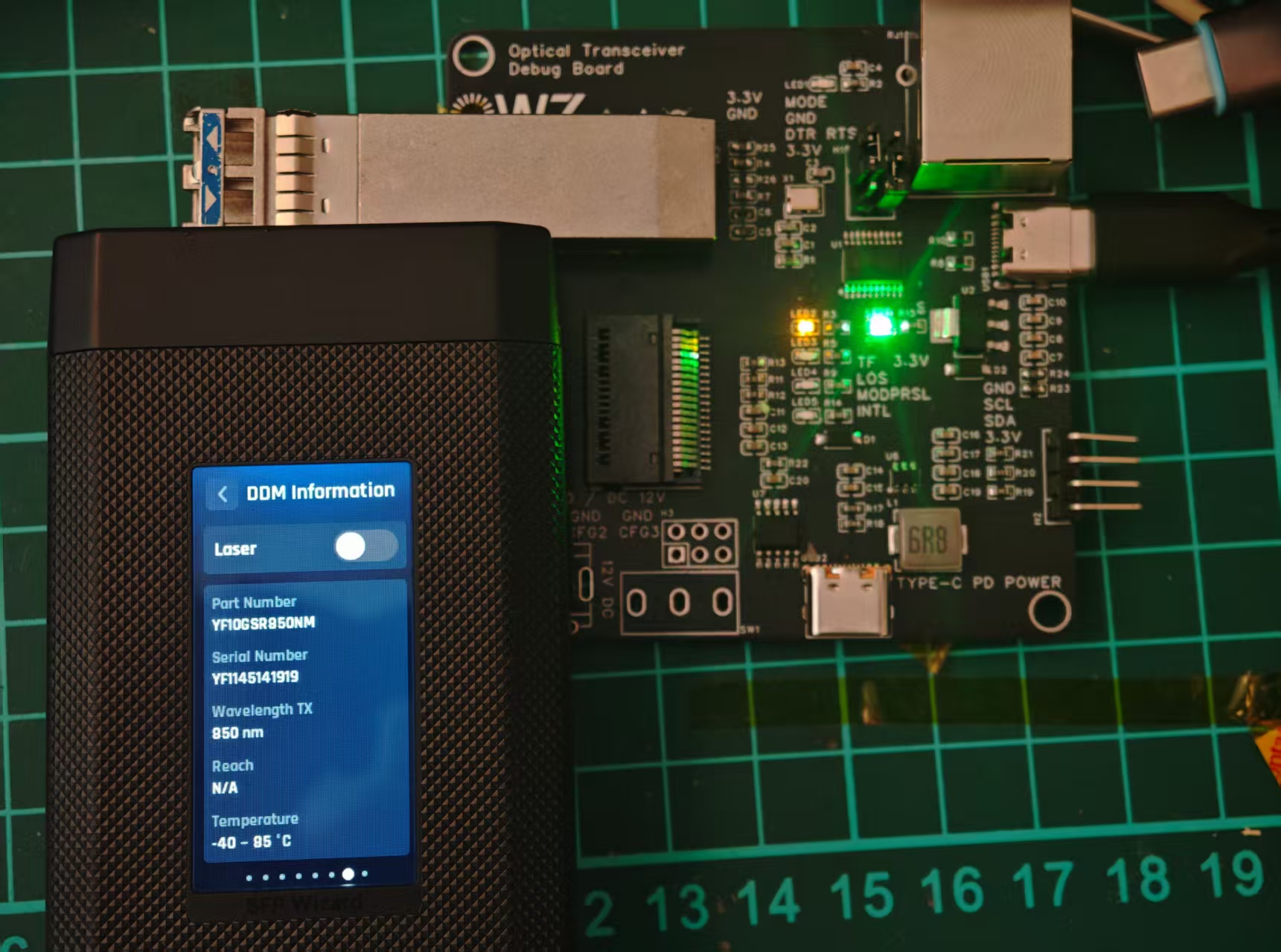
那么臭SN的模块有什么插入交换机的必要嘛
管理接口与通信规范(你最常碰到的)
统一使用 I²C / SMBus(不是 UART)
管理地址差异
SFP:
0x50:基础信息0x51:DDM / 实时诊断
QSFP:
所有内容都在
0x50通过 Page 切换访问
下面的文章内容,我们就以如何改一个SFP模块的信息为案例,方法基本一样的。
如何写
SFP(SFF-8472)
📦 地址 0x50(A0h)
SFP Wizard好用吗
在做这个的时候我遇到了个OEM的模块,他并不是默认密码也不是常用密码,我并无法编辑这个模块,但是我通过写了手上的另外一个模块,然后UI的SFP Wizard却可以直接copy过去。(我有点怀疑是其他方式,有点想做个转接板抓一下是怎么操作的)
不论体积还是设计,我觉得SFP Wizard都是挺棒的(除去国内溢价的问题)
缺点可能就是只能copy profile和没锁的模块(虽然可能有点厂商方法),并不能自定义改信息。
写码板从哪来
 那当然是我们天大的好心人嘉立创呀,立即打开嘉立创开始白嫖板子x
如果你想少焊点东西,其实白嫖个板子焊两个座子,然后直接引出排针外接到你的什么CH347或者其他工具都行,反正能跑个通个i2c就行,记得做下上拉
因为我没有可调电源或者其他稳定的电源,所以我自己给自己的板子就做的复杂了一点,加了PD供电,QSFP的模块最大需求电流可以去到3A但是普通的电源芯片扛不住做了PD得到12V然后DC-DC用TPS54302DDCR降回3.3V(虽然顺带画了DC但是最后其实连DC座子都没买x)
做出来后你会发现整个BOM表里最贵的,不是CH347/其他串口转换芯片,而是QSFP的那个接口。
用什么软件?
因为没有买任何商业方案,这里就不考虑用各位专用的软件,比较你只要实现和i2c,所以其实随便什么调试软件都可以,甚至您有需求直接让AI生成脚本即可。
如果你要研究模块,您可以用ch347demo ,wch官网的工具即可。
如果你要简单的更改一个模块,我建议是直接用一个python脚本
下面是GPT帮我做的一个脚本(会尝试默认密码解锁)
# finisar_9bb03dfa_writer_adaptive.py
# -*- coding: utf-8 -*-
"""
Finisar / 9B B0 3D FA 密码族专用写码工具(全字段自适应版)

特点:
  - 使用你 fuzz 出的解锁序列:
        A2: 7B-7E = 9B B0 3D FA
        A2: 78    = 01
        A0: 7B-7C = A5 5A
        A0: 7D    = 01, 02
        A0: 7F    = 00
  - 对四个字段全部做“逐字节可写性检测”:
        Vendor: A0[0x14-0x23]
        PN    : A0[0x28-0x37]
        SN    : A0[0x44-0x53]
        Date  : A0[0x54-0x5B]
    然后**仅对可写的字节进行更新**,避免出现莫名其妙的半吊子状态。
  - checksum:
        先写字段 → 重读实际内容 → 按 SFF-8472 规则重新计算 checksum
        再对 CK0(A0[0x3F]) / CK1(A0[0x5F]) 各做单字节可写性测试,能写才写。

用法:
  python finisar_9bb03dfa_writer_adaptive.py --info
  python finisar_9bb03dfa_writer_adaptive.py --sn YF1145141919
  python finisar_9bb03dfa_writer_adaptive.py --vendor YFSAMA --pn YF10GSR850NM --sn YF1145141919 --date 251210
"""

import sys
import time
import datetime
from ch347_dll_i2c import CH347_I2C, CH347Error


# ===== 基础 I2C 工具 =====

def pad_ascii(s: str, length: int) -> bytes:
    b = s.encode("ascii", errors="ignore")[:length]
    return b + b" " * (length - len(b))


def read_page(i2c: CH347_I2C, dev: int) -> bytes:
    buf = bytearray()
    for off in range(0, 256, 16):
        buf.extend(i2c.i2c_read(dev, off, 16))
    return bytes(buf)


def write_bytes(i2c: CH347_I2C, dev: int, off: int, data: bytes):
    buf = bytes([off & 0xFF]) + data
    i2c.i2c_write(dev, buf)
    time.sleep(0.003)


def write_byte(i2c: CH347_I2C, dev: int, off: int, val: int):
    i2c.i2c_write(dev, bytes([off & 0xFF, val & 0xFF]))
    time.sleep(0.002)


def decode_ascii(buf: bytes, start: int, length: int) -> str:
    raw = buf[start:start+length]
    try:
        s = raw.decode("ascii", errors="ignore")
    except Exception:
        s = "".join(chr(b) if 32 <= b <= 126 else " " for b in raw)
    return s.strip()


# ===== checksum 计算 =====

def fix_sff8472_a0_checksums(a0: bytearray) -> None:
    if len(a0) < 96:
        raise ValueError("A0 长度不足 96 字节")
    c0 = sum(a0[0:63]) & 0xFF
    a0[63] = c0
    c1 = sum(a0[64:95]) & 0xFF
    a0[95] = c1


# ===== 信息输出 =====

def print_module_info(a0: bytes):
    print("=== 当前模块基本信息 (A0) ===")
    print(f"  Vendor      : {decode_ascii(a0, 0x14, 16)}")
    print(f"  Part Number : {decode_ascii(a0, 0x28, 16)}")
    print(f"  Revision    : {decode_ascii(a0, 0x38, 4)}")
    print(f"  Serial No   : {decode_ascii(a0, 0x44, 16)}")
    print(f"  Date Code   : {decode_ascii(a0, 0x54, 8)}")

    wavelength = (a0[60] << 8) | a0[61] if len(a0) > 61 else 0
    br_nominal = a0[12] * 100 if len(a0) > 12 else 0
    if wavelength:
        print(f"  Wavelength  : {wavelength} nm")
    if br_nominal:
        print(f"  Nominal BR  : {br_nominal} Mbps")
    print()


# ===== 解锁序列(你 fuzz 出的那条) =====

def finisar_unlock(i2c: CH347_I2C):
    print(">>> 执行 Finisar 9B B0 3D FA 解锁序列 ...")

    # A2: 4B 工厂密码
    write_byte(i2c, 0x51, 0x7B, 0x9B)
    write_byte(i2c, 0x51, 0x7C, 0xB0)
    write_byte(i2c, 0x51, 0x7D, 0x3D)
    write_byte(i2c, 0x51, 0x7E, 0xFA)

    # A2: 模式位
    write_byte(i2c, 0x51, 0x78, 0x01)

    # A0: 用户密码
    write_byte(i2c, 0x50, 0x7B, 0xA5)
    write_byte(i2c, 0x50, 0x7C, 0x5A)

    # A0: 命令序列
    write_byte(i2c, 0x50, 0x7D, 0x01)
    write_byte(i2c, 0x50, 0x7D, 0x02)

    # A0: Page 0
    write_byte(i2c, 0x50, 0x7F, 0x00)

    print(">>> 解锁序列发送完成。\n")


# ===== 自适应可写性检测 =====

def test_byte_writable(i2c: CH347_I2C, dev: int, off: int, orig_val: int) -> bool:
    """
    测试单字节是否可写:
      1) 写入一个 != 原值的测试值
      2) 立即读回,看是否等于测试值
      3) 尝试写回原值
    """
    test_val = (orig_val + 1) & 0x7E
    if test_val == orig_val:
        test_val = (orig_val + 2) & 0x7E
    if test_val < 0x20:
        test_val = 0x41  # 'A'

    write_byte(i2c, dev, off, test_val)
    rb = i2c.i2c_read(dev, off, 1)[0]
    writable = (rb == test_val)

    # 恢复原值(尽量)
    write_byte(i2c, dev, off, orig_val)
    _ = i2c.i2c_read(dev, off, 1)[0]

    return writable


def detect_writable_mask(i2c: CH347_I2C, dev: int, base_off: int, length: int, label: str):
    """
    对 [base_off, base_off+length) 区域做逐字节可写性检测。
    返回 (original_bytes, mask[list[bool]])。
    """
    original = bytes(i2c.i2c_read(dev, base_off, length))
    writable = []

    print(f">>> [{label}] 对 dev=0x{dev:02X}, offset=0x{base_off:02X}-0x{base_off+length-1:02X} 做可写性测试 ...")
    for i in range(length):
        off = base_off + i
        orig_val = original[i]
        w = test_byte_writable(i2c, dev, off, orig_val)
        writable.append(w)
        print(f"  - offset 0x{off:02X}: 原值=0x{orig_val:02X}, 可写? {w}")
    print()
    return original, writable


def apply_field_with_mask(i2c: CH347_I2C, dev: int, base_off: int, new_bytes: bytes,
                          writable_mask, label: str):
    """
    按掩码写入字段:
      - 只对 mask=True 的 byte 实际写入
      - 每个字节写完立即读回验证
    """
    print(f">>> [{label}] 按可写掩码写入 ...")
    any_written = False
    for i, can_write in enumerate(writable_mask):
        off = base_off + i
        target = new_bytes[i]
        if not can_write:
            continue
        write_byte(i2c, dev, off, target)
        rb = i2c.i2c_read(dev, off, 1)[0]
        ok = (rb == target)
        any_written = any_written or ok
        print(f"  offset 0x{off:02X}: 写入 0x{target:02X},读回 0x{rb:02X} / 成功? {ok}")
    if not any_written:
        print(f"  ⚠ [{label}] 没有任何字节真正写成功(该字段可能被写保护或由 MCU 回刷)。")
    print()
    return any_written


# ===== 主流程 =====

def main():
    vendor = None
    pn = None
    sn = None
    date_code = None
    info_only = False

    args = sys.argv[1:]
    i = 0
    while i < len(args):
        a = args[i]
        if a == "--vendor" and i + 1 < len(args):
            vendor = args[i + 1]
            i += 2
        elif a == "--pn" and i + 1 < len(args):
            pn = args[i + 1]
            i += 2
        elif a == "--sn" and i + 1 < len(args):
            sn = args[i + 1]
            i += 2
        elif a == "--date" and i + 1 < len(args):
            date_code = args[i + 1]   # "YYMMDD"
            i += 2
        elif a == "--info":
            info_only = True
            i += 1
        else:
            print(f"未知参数: {a}")
            print("用法:")
            print("  python finisar_9bb03dfa_writer_adaptive.py --info")
            print("  python finisar_9bb03dfa_writer_adaptive.py [--vendor V] [--pn PN] [--sn SN] [--date YYMMDD]")
            return

    i2c = CH347_I2C()
    try:
        print(">>> 打开 CH347 ...")
        i2c.open(speed_mode=1)

        # 备份
        ts = datetime.datetime.now().strftime("%Y%m%d_%H%M%S")
        a0 = read_page(i2c, 0x50)
        a2 = read_page(i2c, 0x51)
        open(f"finisar_before_50_{ts}.bin", "wb").write(a0)
        open(f"finisar_before_51_{ts}.bin", "wb").write(a2)
        print(">>> 已备份 A0/A2 到 finisar_before_*.bin\n")

        print_module_info(a0)

        if info_only and vendor is None and pn is None and sn is None and date_code is None:
            print("(info 模式,不执行写入。)")
            return

        # 构造“目标 A0”缓冲,仅用于算目标值和 checksum
        a0_target = bytearray(a0)
        any_field_requested = False

        if vendor is not None:
            new_v = pad_ascii(vendor, 16)
            print(f"  目标 Vendor='{vendor}' → A0[0x14-0x23]")
            a0_target[0x14:0x24] = new_v
            any_field_requested = True

        if pn is not None:
            new_pn = pad_ascii(pn, 16)
            print(f"  目标 PN='{pn}' → A0[0x28-0x37]")
            a0_target[0x28:0x38] = new_pn
            any_field_requested = True

        if sn is not None:
            new_sn = pad_ascii(sn, 16)
            print(f"  目标 SN='{sn}' → A0[0x44-0x53]")
            a0_target[0x44:0x54] = new_sn
            any_field_requested = True

        # Date:如果你传了 --date 就按你传的;否则默认用当前日期
        if date_code is None:
            now = datetime.datetime.now()
            date_code = now.strftime("%y%m%d")
        new_date = pad_ascii(date_code, 8)
        print(f"  目标 Date='{date_code}' → A0[0x54-0x5B]")
        a0_target[0x54:0x5C] = new_date
        any_field_requested = True

        if not any_field_requested:
            print("★ 没有任何字段需要修改,结束。")
            return

        old_ck0, old_ck1 = a0[0x3F], a0[0x5F]
        fix_sff8472_a0_checksums(a0_target)
        new_ck0, new_ck1 = a0_target[0x3F], a0_target[0x5F]
        print(f"\n  目标 Checksum(0..62): 0x{old_ck0:02X} -> 0x{new_ck0:02X}")
        print(f"  目标 Checksum(64..94): 0x{old_ck1:02X} -> 0x{new_ck1:02X}\n")

        # 解锁
        finisar_unlock(i2c)

        # ===== 对各字段做自适应写入 =====
        wrote_any_field = False

        # Vendor
        if vendor is not None:
            print("=== Vendor 自适应写入 ===")
            orig_v, mask_v = detect_writable_mask(i2c, 0x50, 0x14, 16, "Vendor")
            print(f"  原始 Vendor 字节:{orig_v}")
            print(f"  可写掩码          :{mask_v}")
            new_v_bytes = a0_target[0x14:0x24]
            if apply_field_with_mask(i2c, 0x50, 0x14, new_v_bytes, mask_v, "Vendor"):
                wrote_any_field = True

        # PN
        if pn is not None:
            print("=== PN 自适应写入 ===")
            orig_pn, mask_pn = detect_writable_mask(i2c, 0x50, 0x28, 16, "PN")
            print(f"  原始 PN 字节:{orig_pn}")
            print(f"  可写掩码     :{mask_pn}")
            new_pn_bytes = a0_target[0x28:0x38]
            if apply_field_with_mask(i2c, 0x50, 0x28, new_pn_bytes, mask_pn, "PN"):
                wrote_any_field = True

        # SN
        if sn is not None:
            print("=== SN 自适应写入 ===")
            orig_sn, mask_sn = detect_writable_mask(i2c, 0x50, 0x44, 16, "SN")
            print(f"  原始 SN 字节:{orig_sn}")
            print(f"  可写掩码     :{mask_sn}")
            new_sn_bytes = a0_target[0x44:0x54]
            if apply_field_with_mask(i2c, 0x50, 0x44, new_sn_bytes, mask_sn, "SN"):
                wrote_any_field = True

        # Date(总是尝试,因为很多模块允许你更新生产日期)
        print("=== Date 自适应写入 ===")
        orig_d, mask_d = detect_writable_mask(i2c, 0x50, 0x54, 8, "Date")
        print(f"  原始 Date 字节:{orig_d}")
        print(f"  可写掩码       :{mask_d}")
        new_date_bytes = a0_target[0x54:0x5C]
        if apply_field_with_mask(i2c, 0x50, 0x54, new_date_bytes, mask_d, "Date"):
            wrote_any_field = True

        # ===== 校正 checksum =====
        print("=== 校正 checksum ===")
        a0_after_fields = bytearray(read_page(i2c, 0x50))
        ck0_before, ck1_before = a0_after_fields[0x3F], a0_after_fields[0x5F]
        fix_sff8472_a0_checksums(a0_after_fields)
        ck0_target, ck1_target = a0_after_fields[0x3F], a0_after_fields[0x5F]
        print(f"  当前 CK0,CK1: 0x{ck0_before:02X}, 0x{ck1_before:02X}")
        print(f"  重新计算后目标:CK0=0x{ck0_target:02X}, CK1=0x{ck1_target:02X}")

        # checksum 也按单字节做可写性检测
        _, ck0_mask = detect_writable_mask(i2c, 0x50, 0x3F, 1, "CK0")
        _, ck1_mask = detect_writable_mask(i2c, 0x50, 0x5F, 1, "CK1")

        if ck0_mask[0]:
            write_byte(i2c, 0x50, 0x3F, ck0_target)
            ck0_back = i2c.i2c_read(0x50, 0x3F, 1)[0]
            print(f"  CK0 写入后:0x{ck0_back:02X} / 成功? {ck0_back == ck0_target}")
        else:
            print("  CK0 字节似乎不可写,跳过。")

        if ck1_mask[0]:
            write_byte(i2c, 0x50, 0x5F, ck1_target)
            ck1_back = i2c.i2c_read(0x50, 0x5F, 1)[0]
            print(f"  CK1 写入后:0x{ck1_back:02X} / 成功? {ck1_back == ck1_target}")
        else:
            print("  CK1 字节似乎不可写,跳过。")

        # ===== 最终检查 =====
        a0_final = read_page(i2c, 0x50)
        print("\n=== 最终 A0 字段检查 ===")
        print_module_info(a0_final)

    except CH347Error as e:
        print("✖ CH347 错误:", e)
    except Exception as e:
        print("✖ 未预期异常:", e)
    finally:
        try:
            i2c.close()
            print(">>> CH347 已关闭。")
        except Exception:
            pass


if __name__ == "__main__":
    main()
用法:
  python finisar_9bb03dfa_writer_adaptive.py --info
  python finisar_9bb03dfa_writer_adaptive.py --sn YF1145141919
  python finisar_9bb03dfa_writer_adaptive.py --vendor YFSAMA --pn YF10GSR850NM --sn YF1145141919 --date 251210
常见加密方法
Vendor Lock / 写保护是怎么做的?
🔐 常见锁机制
为什么会出现模块不兼容
这里是GPT给出的,实际可能会根据厂商有点差距
并不是“光学不通”,而是“管理面不通过”
99% 的“不兼容”并非:
光功率不够
波长不对
速率不支持
而是👇
I²C / CMIS 管理检查失败
交换机在插模块后的真实流程是:
模块插入
 ↓
I²C 读取 EEPROM
 ↓
校验 Vendor / PN / Compliance / CRC
 ↓
校验是否在白名单
 ↓
决定是否:
  - 启用 TX
  - 报错
  - 限速
  - 直接 shutdown
光还没亮,管理面已经判你死刑。
交换机是“主动审查者”,不是被动设备
🔍 交换机通常会检查什么?
1️⃣ Vendor 信息(最基础)
👉 你改 SN 没用,Vendor Name 才是第一道门
2️⃣ 厂商白名单(最关键)
几乎所有品牌交换机都有:
硬编码白名单
软件版本差异白名单
ASIC / Linecard 特定白名单
例如:
👉 同一模块:A 交换机能用,B 不能用 = 白名单不同
CMIS / QSFP28 是“地狱模式”
你已经踩到这里了,这里是兼容性最复杂的地方。
🧠 CMIS 带来的新问题
1️⃣ Page + State Machine
模块必须处于正确状态:
Low Power
Ready
Application Selected
否则交换机会认为:
“模块存在,但未 ready”
➡️ 你 EEPROM 写对了,但模块状态不对
2️⃣ Application Code 不匹配
QSFP28 / QSFP-DD 会声明:
支持哪些速率
支持哪些 Host Interface
支持哪些 Media Interface
交换机做的是:
我这个端口支持 100GBASE-LR4
你模块说你支持的是 FR4 / DR4
→ 不兼容
哪怕光学上完全一样。
为什么“同一个模块”在不同交换机表现不同?
这是最容易误判的点。
常见情况
情况 A:A 交换机能用,B 不行
原因:
A 白名单宽
B 校验更严格
B 需要特定 PN / Rev
情况 B:老版本能用,新版本不行
原因:
OS 升级
新增 Vendor Check
修补“第三方模块漏洞”
情况 C:端口不同,行为不同
原因:
不同 ASIC
不同 Linecard
不同端口速率 profile
- 0
- 0
-
分享